CLI Output
Terminal output is attention. A conforming tool spends that attention only on what the person (or agent) at the terminal needs to act on, keeps everything else one predictable step away in a log, and never hides the reason for a failure.
The key words MUST, MUST NOT, SHOULD, SHOULD NOT and MAY are to be interpreted as described in BCP 14unchecked (RFC 2119, RFC 8174) when, and only when, they appear in all capitals.
In this page, a conforming tool is a CLI that claims conformance with this standard.
Requirement ids (CO-n) are stable so tools, reviews and certification can cite them.
Default terminal output
- CO-1
-
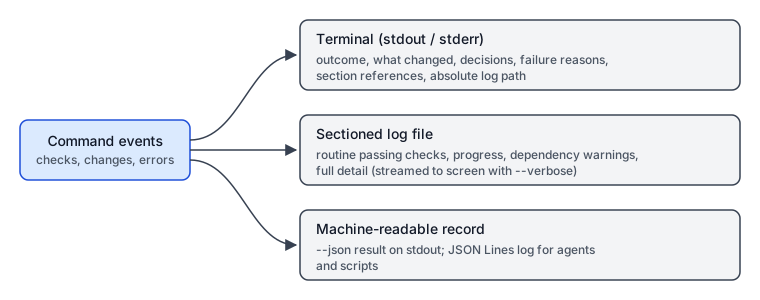
By default, a conforming tool MUST print only:
-
the outcome: success or failure;
-
what changed (files written, packages added, resources created);
-
anything that needs attention or a decision;
-
as the final line, the absolute path to the full log for this run.
-
- CO-2
-
Routine passing checks, progress chatter, and dependency or runtime warnings MUST NOT be printed in full by default. They MUST go to the log. The terminal MAY show a one-word or one-line summary of them (for example
2 warnings - see log §deps). - CO-3
-
A tool that wrote no log for a run (for example, a pure query that prints its answer) MAY omit the log-path line. A tool that wrote a log MUST print the real path, after expanding the home directory, variables and symlinks the user would otherwise have to resolve.
Failures
- CO-4
-
On failure, a conforming tool MUST print an error summary and the key lines that explain the failure inline (the failing command, the error message, the file and line when known). A user MUST NOT need to open the log to learn why a run failed. The log holds the full context; the terminal holds the reason.
- CO-5
-
When the cause of a failure is a warning that was summarised earlier, the failure output MUST repeat that warning in full.
Sectioned, indexed logs
- CO-6
-
Logs MUST be divided into named sections (for example
deps,build,test,network), and each section MUST be findable by name in the log file: a header line such as== §deps ==, or an index at the top of the log listing section names and line offsets. - CO-7
-
Terminal summaries SHOULD reference the log section that holds the detail (
2 warnings - see log §deps), so a reader can jump straight to it.
Verbose and quiet modes
- CO-8
-
A conforming tool MUST provide
--verbose(short form-vwhen it does not clash) that streams the full detail to the terminal as it happens. It MUST also honour an environment variable with the same effect, named<TOOL>_VERBOSE(for examplePKG_VERBOSE=1). The command-line flag takes precedence over the environment variable. - CO-9
-
A tool SHOULD offer automatic verbose output when it runs in CI or when stdout is not a terminal (TTY), because logs in CI are often lost with the runner. This behaviour MUST be configurable, and the tool MUST document its default. A common CI marker is the
CIenvironment variable. - CO-10
-
A tool MAY offer
--quietthat suppresses everything except errors, decisions and the log path.
Machine-readable output
- CO-11
-
A conforming tool MUST provide machine-readable output for agents and scripts:
--jsonprints a single JSON result document on stdout, and the log MUST be available as JSON Lines (one event object per line), either as the log itself or as a sibling file. - CO-12
-
Machine-readable results MUST include the outcome, the exit code, the list of changes, the items needing attention, and the log path. Each JSON Lines event SHOULD carry a timestamp, a level, a section name, and a message.
- CO-13
-
The JSON result’s field names and meanings are a public interface. Removing or renaming a field is a breaking change.
Log locations and rotation
- CO-14
-
Logs MUST be written to a predictable per-OS location:
OS Default log directory Linux and other XDG systems
$XDG_STATE_HOME/<tool>/logs/(default~/.local/state/<tool>/logs/)macOS
~/Library/Logs/<tool>/Windows
%LOCALAPPDATA%\<tool>\logs\A tool MAY let the user override the directory by flag, config or environment variable.
- CO-15
-
Each run SHOULD get its own log file, named with a sortable timestamp (for example
2026-10-20T19-30-05.log). Logs MUST be rotated or pruned (by count, age or total size) so they do not grow without limit, and the retention policy MUST be documented.
Interactive prompts
- CO-16
-
Prompts that need an answer MUST stay on screen, even in the default quiet output. A prompt MUST NOT be hidden in the log. When no answer can be read (no TTY), the tool MUST fail with a clear message naming the flag or setting that supplies the answer, rather than hang.
Exit codes
- CO-17
-
The exit code MUST be
0on success and non-zero on failure. A run that finished but left something needing a decision MUST NOT exit0if the requested work is incomplete. - CO-18
-
A tool SHOULD use distinct, documented non-zero codes for distinct failure classes (for example usage error, failed check, network failure), and SHOULD reserve
2for usage errors as many CLIs do.
stdout and stderr
- CO-19
-
The result of a command (the data a pipeline or script consumes, including
--jsonoutput) MUST go to stdout. - CO-20
-
Diagnostics, progress, warnings, errors, prompts and the log-path line MUST go to stderr, so that piping stdout yields only the result. For tools whose whole job is an action rather than data (for example an installer), the human summary MAY go to stdout, but
--jsonoutput MUST then be the only thing on stdout.
Example: package install
A noisy, non-conforming install:
$ pkg install webapp
Resolving dependencies...
Fetching metadata 1/214
Fetching metadata 2/214
...
WARN deprecated [email protected]: This module is not supported
WARN deprecated [email protected]: Glob versions prior to v9 are no longer supported
WARN peer dependency react@18 not satisfied by [email protected]
Linking 214 packages...
Running postinstall for esbuild... ok
Running postinstall for sharp... ok
Done in 14.2s
The person at the terminal has to read every line to learn that nothing failed, cannot tell which warning matters, and has no path to the detail once the terminal scrolls.
The same install, conforming:
$ pkg install webapp
ok: installed webapp 3.4.0 (214 packages added)
attention: peer dependency react@18 not satisfied by [email protected] - see log §deps
2 deprecation warnings - see log §deps
log: /home/ryan/.local/state/pkg/logs/2026-10-20T19-30-05.log
And when it fails:
$ pkg install webapp
failed: postinstall for sharp exited 1
  sharp: libvips 8.15 not found; install libvips-dev or set SHARP_IGNORE_GLOBAL_LIBVIPS=1
  (from log §postinstall, line 412)
log: /home/ryan/.local/state/pkg/logs/2026-10-20T19-31-40.log
The reason for the failure is on screen; the log holds the rest.
Rationale
-
Attention is the scarce resource. Routine output trains people to stop reading, so the one line that matters gets missed. Showing only outcome, changes and decisions keeps every printed line worth reading.
-
Agents pay for every line. AI agents read terminal output as tokens. Progress chatter costs context and money and buries the signal; a short default plus
--jsongives agents the result without the noise. -
Nothing is lost. Detail moves to a predictable, indexed log instead of disappearing. The final log-path line and section references make the detail one step away.
-
Failures must explain themselves. Requiring someone to open a log to learn why something failed adds a step at the worst moment, and agents often never take that step. Inline reasons fix both.
-
Scripts need a stable contract. Separating results (stdout) from diagnostics (stderr), meaningful exit codes, and versioned JSON fields let tools compose in pipelines without scraping human text.
-
CI is a different audience. There is no one to rerun with
--verboseafter the runner is gone, so CI and non-TTY runs may need full output by default.
See also Design Considerations for the AI compatibility concerns this page builds on.